By Happy Singhwal · Last updated: October 6, 2026
Quick answer: You can use ChatGPT to draft emails and resumes by giving it clear details (who you’re writing to, your goal, the tone you want, and your real experience) and then editing the draft yourself. The AI gives you a starting point. You make sure it is accurate and sounds like you.
Table of Contents
What You Need
- A free ChatGPT account (plans and limits change, so check the official site for current details)
- About 15 to 20 minutes
- Your real details: the purpose of the email, the person you’re writing to, and, for a resume, your actual jobs, dates, skills and results
Part 1: How to Write a Professional Email with ChatGPT
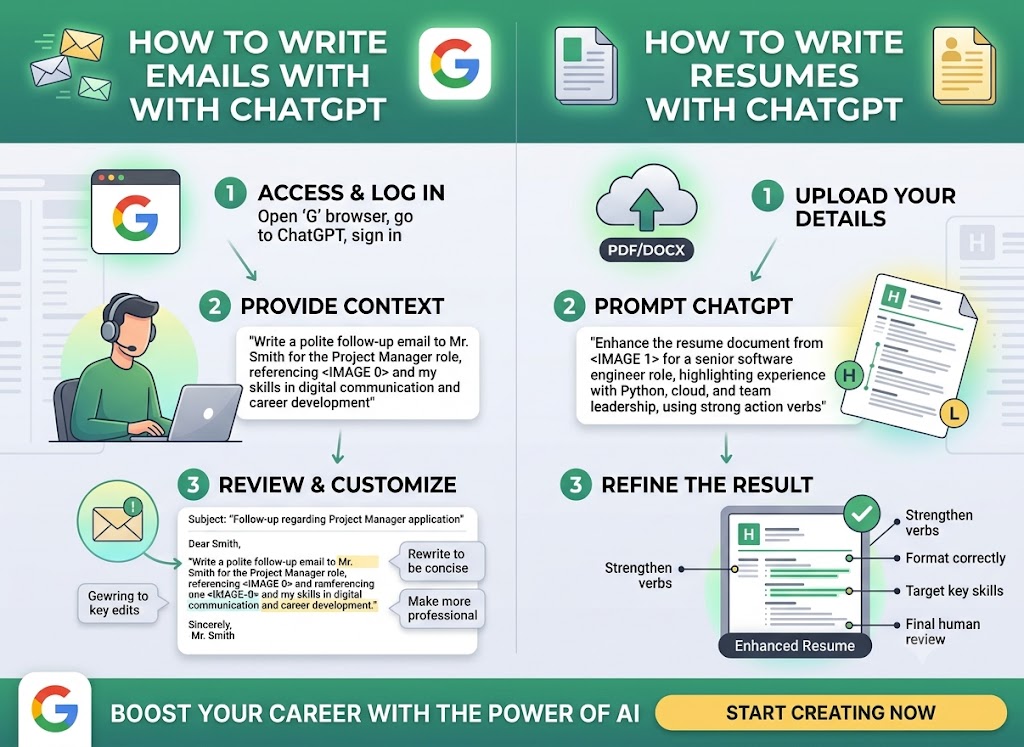
Step 1: Decide on one goal.
One email, one goal. For example, ask for leave, follow up on a job application, request a refund, or introduce yourself.
Step 2: Give ChatGPT the context.
A weak prompt like “Write an email for leave” gives a generic result. Use this formula instead: who + goal + key facts + tone + length.
Write a polite email to my manager asking for 2 days of leave on [dates] for a family function. Mention that I will finish my pending report before leaving. Keep it professional and under 120 words.
Step 3: Read and edit the draft.
Check names, dates and facts. Delete any line you would never say in real life. Shorten anything that sounds stiff.
Step 4: Ask for improvements.
Try follow-ups such as “Make it shorter.” “Make the tone more formal,” or “Give me 3 subject line options.”
Example (illustrative sample, written for demonstration):
Subject: Leave Request for [Dates]
Hi [Manager’s Name],
I would like to request two days of leave on [dates] to attend a family function. I will complete my pending report before I leave and can hand over any urgent work to [Colleague’s Name] during my absence.
Thank you for considering my request.
Regards,
[Your Name]
What to check in any AI-written email
- Is every name, date and fact correct?
- Does it sound like something you would actually say?
- Is the request clear in the first two lines?
- Is it short enough that the reader won’t skip it?
Part 2: How to Build a Resume with ChatGPT
Step 1: Collect your real information first.
Write down your job titles, dates, responsibilities, results, skills and education. ChatGPT cannot know these, and it should never guess them.
Step 2: Write your summary.
Here are my details: [paste your real information]. Write a 3-line professional summary for a [job title] resume. Use only the information I gave. Do not add skills or achievements.
The line “use only the information I gave” matters. Without it, AI tools can add things you never did.
Step 3: Turn duties into achievement bullets.
Rewrite these into resume bullet points that start with an action verb. Use numbers only if I provided them: [paste your duties]
A simple formula: action verb + what you did + result.
Example (illustrative sample):
Before: Responsible for handling customer queries.
After: Resolved customer queries by phone and email and escalated complex cases to the support lead.
Add numbers (like how many queries per day) only if they are true.
Step 4: Tailor it to the job.
Here is a job description: [paste]. Compare it with my resume and tell me which skills or keywords I should add, but only if they are true for me.
Step 5: Keep the format simple and proofread.
Some employers use applicant tracking software (ATS), so use a clean layout and standard headings. Check dates, spelling and contact details before sending.
4 Prompt Templates You Can Copy
- Job application email: “Write a short email applying for [job title] at [company]. I have [X years/months] of experience in [field]. Mention that my resume is attached. Keep the tone confident but polite.”
- Interview follow-up: “Write a thank-you email after my interview for [role]. Mention [one topic we discussed]. Keep it under 100 words.”
- Resume bullets: “Turn these tasks into 3 bullet points starting with action verbs: [tasks].”
- Subject lines: “Give me 5 clear subject lines for an email about [topic].”
Mistakes to Avoid
- Sending the draft without editing. It may contain wrong facts or an unnatural tone.
- Letting AI invent experience or numbers. You are responsible for every line on your resume.
- Using vague prompts. More detail gives better drafts.
- Sharing private information. Do not paste ID numbers, bank details, passwords or your full home address.
- Using the same text for every job. Tailor each application.
Is It Safe to Share Personal Details with ChatGPT?
Avoid sensitive details altogether. Check the data and privacy settings in your account, and remember that menu names can change over time. When in doubt, use placeholders such as [Company] or [Your Name] and fill in the real details later.
Free Alternatives
Other AI chatbots, such as Google Gemini or Microsoft Copilot, can handle similar drafting tasks. Features and free limits differ and change often, so try the same prompt in two tools and compare which draft sounds more natural to you.
Key Takeaways
- Give the AI clear context: who, goal, facts, tone and length.
- Always edit the draft. You are responsible for what you send.
- Never let AI invent experience, and never share sensitive personal data.
- Tailor every email and resume to the specific person or job.
FAQ
Is ChatGPT free to use?
There is a free option, but features and limits change. Check the official ChatGPT site for the current details.
Can I send what ChatGPT writes without editing?
No. Always review it for accuracy, tone and spelling before you send anything.
Is it okay to use AI to write a resume?
Many people use it for drafting, but the content must be true. Some employers or institutions may have their own rules, so check if you are unsure.
Is it safe to share personal details with ChatGPT?
Avoid sharing sensitive information, and review your account’s privacy settings.
Sources and Further Reading
Disclaimer: This article is for general information only. Tools, features and prices can change. Please read our disclaimer.